Module Overview
<Accueil » Administration » Module Overview
The Administration module enables administrators to manage SIGLS.NET users, as well as several security parameters with regards to the application in general.
Moreover, the Administration module allows you to create lists and offers various configuration options
Overview of the Screens Available in the Administration Module
This topic aims at providing a summary description of every screen available in the Administration module. You may click on a screen name in a table to access the corresponding help topic, if applicable.
The "Security" Section
The "Security" Section contains screens that enable you to manage menu items, user groups and users.
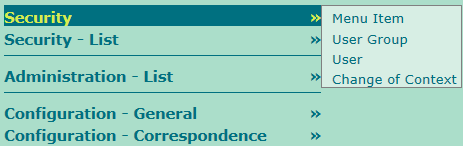
The table below describes the screens available in the "Security" section. You may click on a screen name in a table to access the corresponding help topic, if applicable.
| Screen | Description |
| Menu Item | Still to come... |
| User Group | Enables you to create and manage user groups users can be associated to, and manage their access rights. |
| User | Enables you to create and manage users. Among other things, this screen enables you to change passwords, disable user accounts and associate an electronic signature to a user. |
| Change of Context | Still to come... |
The "Security - List" Section
The "Security - List" section contains a series of lists related to menu items, user groups and users.
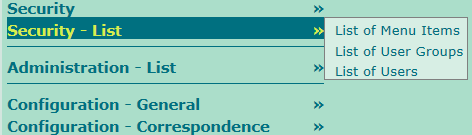
The table below describes the screens available in the "Security - List" section. You may click on a screen name in a table to access the corresponding help topic, if applicable.
| Screen | Description |
| List of Menu Items | Enables you to create lists of menu items, in accordance with miscellaneous criteria. Menu items represents the pages displays in SIGLS.NET's menus. |
| List of User Groups | Enables you to create lists of user groups, in accordance with miscellaneous criteria. |
| List of Users | Permet de créer des listes d'utilisateurs, selon différents critères. Enables you to create lists of users, in accordance with miscellaneous criteria. |
© COGIWEB, 2024